Remake Without the Pain: How We Move Old Animations to a New Rig in UE5
Remaking an older game in Unreal Engine 5 doesn't mean animating every move again from scratch. How old animation clips move to a new UE5 skeleton with IK Rig and IK Retargeter - in five steps, and where it usually goes wrong.
 Sylwester PilarzHead of Design
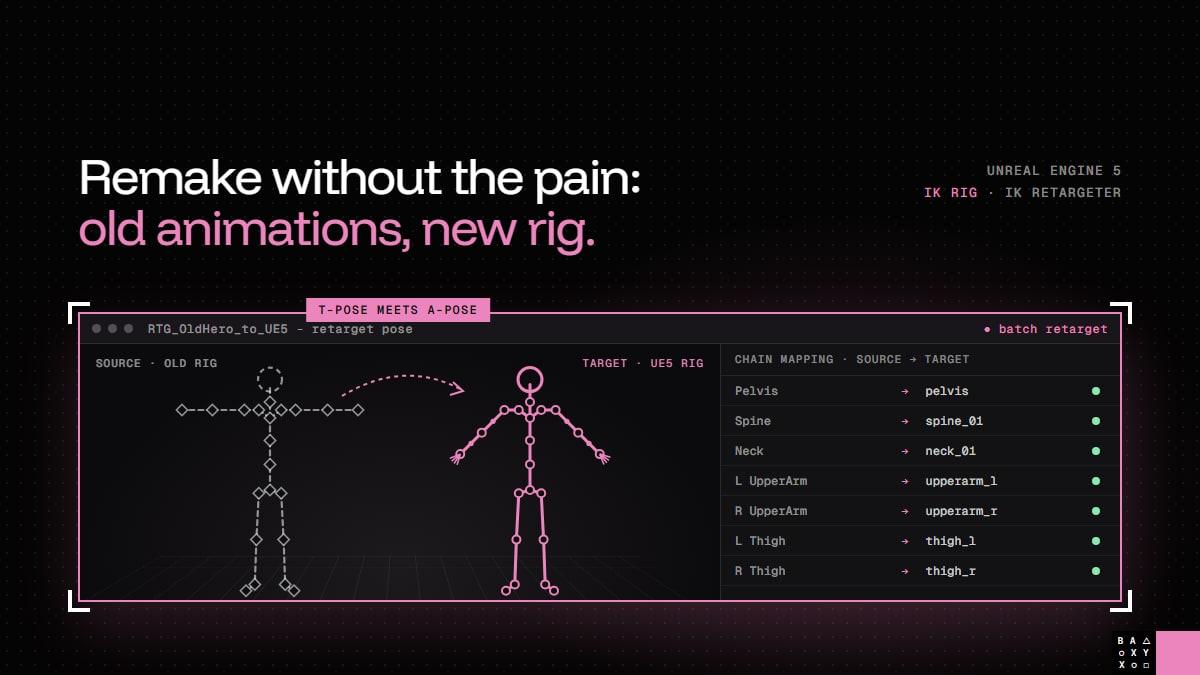
Remaking an older game in Unreal Engine 5? The animations don't have to be redone from scratch.
When a remake moves to a new engine, the characters usually get a new skeleton too: more bones, modern proportions, fingers, twist bones, a rig that works with today's tools. It's tempting to think the old animations can't survive that change. In most cases they can - and they should, because they carry a lot of what players remember about a game.
Here is how old animations move to a new rig in UE5, in five steps.
Why keep the old animations at all?
Because players remember them. Not consciously, but they do: the way a character lands after a jump, how long the reload takes, the little hesitation before a heavy attack. That's the timing, the weight and the personality of the game, and it's very easy to lose in a remake if every move is animated again from a description.
Animation retargeting keeps that motion and moves it onto the new skeleton. The animators' time then goes where it matters: fixing what breaks, and adding what the old rig could never do.
Step 1: Export and clean up
Before anything touches Unreal, the original clips have to come out of the old game - and come out clean.
Sometimes the original source files from the animation package still exist. Often they don't, and the animations only live in the game's own data, which means converting them first. Either way, three things need fixing before retargeting, because retargeting will faithfully copy every mistake:
- Frame rate. Older games often stored animations at lower sample rates. Import them at the wrong rate and every move gets faster or slower - and the timing is exactly what we're trying to keep.
- Scale and axes. Unreal works in centimetres with Z up. Old engines used all kinds of units and up axes, and a skeleton imported at the wrong scale breaks everything that comes after.
- Root motion. Many older skeletons move the whole character by moving the pelvis. Unreal's root motion expects a separate root bone, so the travel is moved onto one - or the clip is kept in place, if that's how the new game will drive movement.
This is legacy asset work: unglamorous, but it decides how much fixing comes later.
Step 2: Build two IK Rigs
An IK Rig describes a skeleton in a way the retargeter can understand. We build one for the old skeleton and one for the new, and both get the same vocabulary:
- a retarget root, usually the pelvis,
- retarget chains with the same names on both sides: Spine, Head, LeftArm, RightArm, LeftLeg, RightLeg.
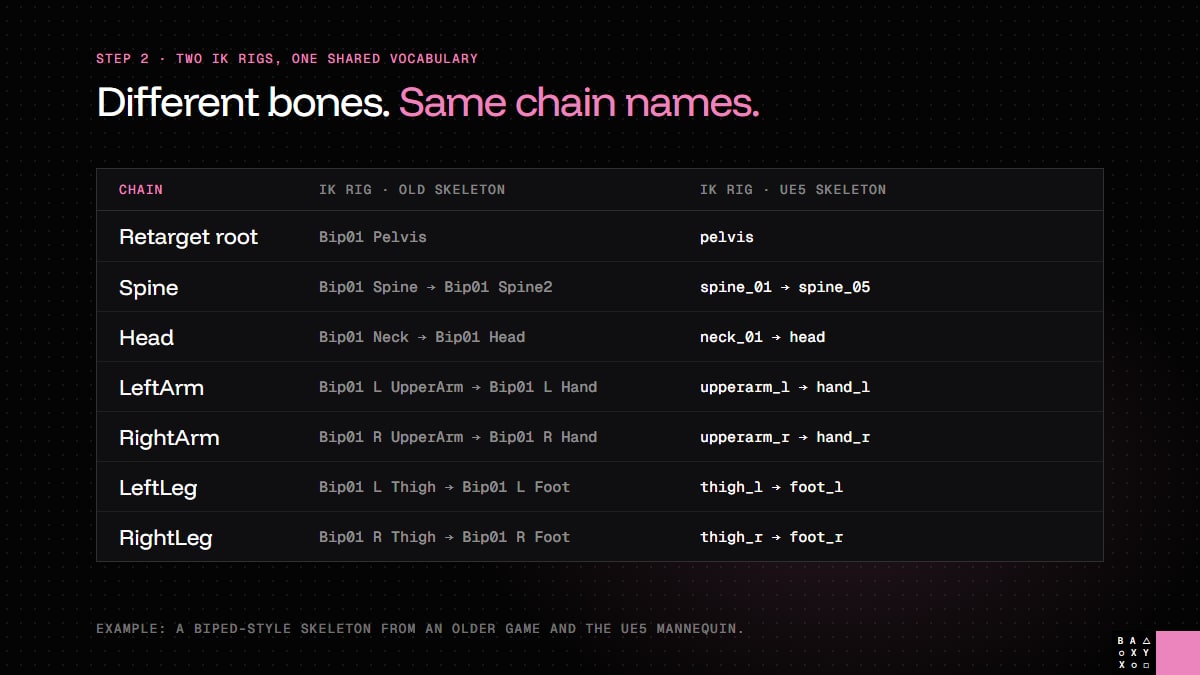
The bones inside each chain can be completely different - three spine bones on the old skeletal rig, five on the new one. What matters is that the chain names match, so the retargeter can pair them up.
Step 3: Match the poses
This is the step that decides whether the result looks right.
Every animation is stored relative to the skeleton's reference pose. If the old skeleton was built in a T-pose (arms straight out) and the new one in an A-pose (arms angled down), the difference between them lands on every single frame. The arms float, the shoulders twist, and it looks like the retargeting is broken.
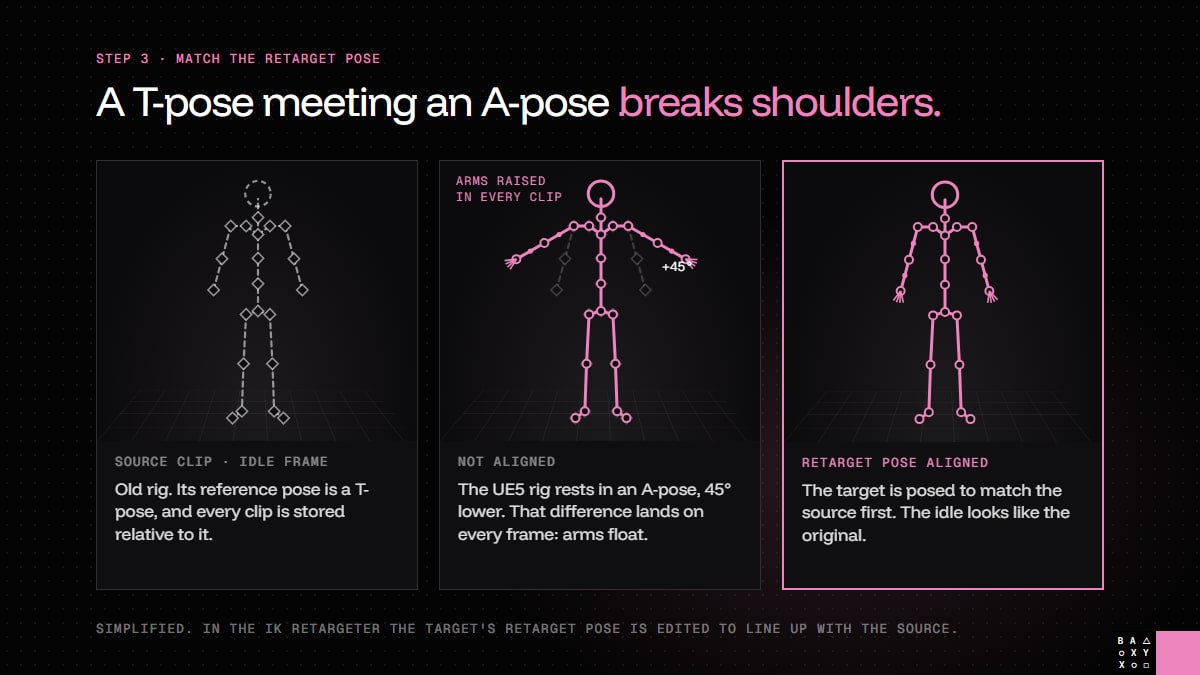
So before exporting anything, the target's retarget pose is edited in the IK Retargeter until it lines up with the source: shoulders, elbows, wrists and spine. Newer versions of UE5 can help with automatic alignment, but it's worth checking every limb by eye. A T-pose meeting an A-pose is where most broken shoulders come from.
Step 4: Batch retarget
Once the chains are mapped and the poses match, the retargeter can export many animations in one pass - hundreds of clips, not one at a time.
This is the step that saves weeks. But it's not the end: it's the moment the real review starts. Every clip that matters gets watched on the new character, especially the ones players see most - locomotion, attacks, interactions, cinematics.
Step 5: Fix contacts, then upgrade
A new skeleton has new proportions, and proportions change contacts. Three things almost always need attention:
- Foot sliding. Longer or shorter legs mean feet that no longer stay planted. IK on the feet keeps them on the ground.
- Hand contacts. Holding a weapon with two hands, grabbing a ledge, opening a door - anything where a hand has to meet something specific.
- Fingers. Old rigs often had no fingers at all, or a single "mitten" bone. The new hands need poses or animation of their own.
Only when the original motion works on the new rig do we add what the old rig never had: finger animation, twist bones for cleaner deformation, extra detail through Control Rig in Unreal. Doing it in this order means the remake builds on the original, instead of replacing it.
What it means for a remake
Retargeting doesn't make a remake easy - nothing does. But it changes where the effort goes. Instead of rebuilding every move from reference and hoping it feels the same, the team starts from the motion players already know and spends its time on quality.
It's one of the reasons a faithful remake on a new engine is realistic at all. If you're weighing up how far to go with an older game, our remake or remaster checklist is a good place to start, and you'll find more about how we work on our remake and remaster page.
Animators and tech artists: what's the trickiest part of retargeting for you?
And if you're planning to bring an older game to Unreal Engine 5, get a free estimate.
Frequently Asked Questions
Can old game animations be reused in Unreal Engine 5?
Yes, in most cases. Old animation clips can be exported, cleaned up and retargeted onto a new UE5 skeleton with IK Rig and IK Retargeter, which keeps the original timing and character of the motion. The results still need review and cleanup, especially for foot and hand contacts.
What is an IK Rig in Unreal Engine 5?
An IK Rig is an asset that describes a skeleton for retargeting: a retarget root (usually the pelvis) and named chains such as Spine, Head, LeftArm, RightArm, LeftLeg and RightLeg. Two IK Rigs with matching chain names let the IK Retargeter transfer animation between different skeletons.
Why do retargeted animations have broken shoulders?
Usually because the source and target skeletons have different reference poses, for example a T-pose and an A-pose. The difference is applied to every frame, so the arms float or twist. Aligning the target's retarget pose with the source in the IK Retargeter fixes it.
How do you fix foot sliding after retargeting?
Foot sliding comes from different leg proportions between the old and new skeletons. Using IK on the feet keeps them planted on the ground, and the key locomotion clips should be reviewed on the new character after retargeting.
Do old animations need to be cleaned up before retargeting?
Yes. Frame rate, scale, up axis and root motion should be fixed before retargeting, because the retargeter copies every mistake onto the new skeleton. Many older skeletons also need a separate root bone for Unreal's root motion.
Does LYNXBYTE GAMES remake games in Unreal Engine 5?
Yes. LYNXBYTE GAMES works on remakes and remasters, including moving older games and their assets to modern engines such as Unreal Engine 5. You can request a free estimate on our website.