Porting Starts Before You Touch the Code: Inside Lynci's Project Scan
One of the first steps in Lynci is the Project Scan. Instead of jumping straight into changing the project, it builds a technical picture of the game first - here's what that actually looks at, and why it matters.
 Sylwester PilarzHead of Design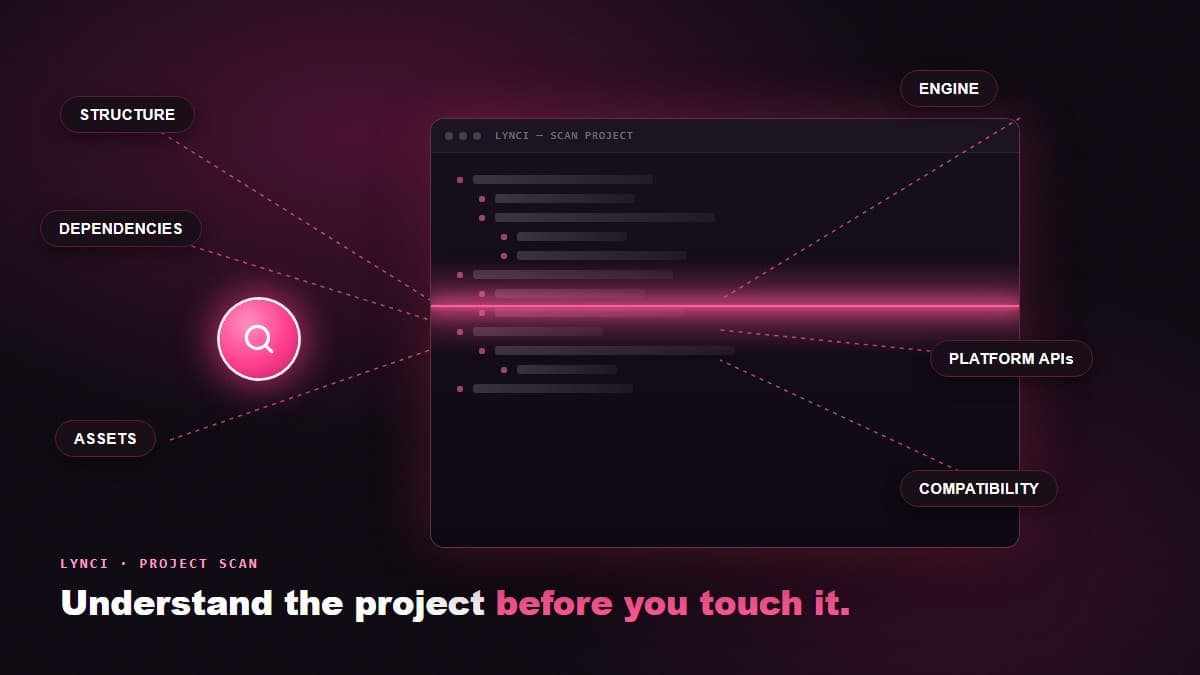
Porting a game starts before you touch the code.
That sounds backwards if you think of porting as a purely technical job - open the project, start changing things, see what breaks. In practice, the teams that port games well spend real time understanding a codebase before they change a single line of it. One of the first steps in Lynci is built around exactly that idea, right after it maps the game's architecture. It's called the Project Scan, and instead of immediately trying to modify the project, it first analyzes what is already there.
What the scan actually looks at
The scan goes through the project and builds a technical picture of the game. That picture is assembled from several layers, not a single pass:
- Project structure and dependencies - how the codebase is organized, what depends on what, and where the load-bearing systems actually live.
- Engine and platform-specific elements - the parts of the project that are tied to a specific engine version or were built with one platform's assumptions baked in.
- Source code and configurations - the actual logic, plus the build settings and configuration files that decide how that logic gets compiled and run.
- Assets and their organization - how art, audio and other content are structured, referenced and streamed, which matters a lot once asset memory budgets get tight on a new platform.
- Plugins, middleware and external libraries - third-party dependencies that may or may not have support for the target platform, and often turn into the trickiest part of a middleware replacement.
- Platform-specific APIs and features - calls and integrations written for the current platform that will need an equivalent, a replacement, or a redesign elsewhere, which is really an API compatibility question.
- Potential compatibility issues - the places where something is likely to break, flagged before anyone has spent time finding that out the hard way.
None of these are checked in isolation. A dependency only matters in context of what it depends on; a platform-specific API call only matters in context of how deeply it's woven into the rest of the code. The scan is built to surface that context, not just produce a list of files.
That context is usually the part a fresh set of eyes can't get quickly by reading through a repository manually. An engineer opening an unfamiliar project for the first time can tell you what a file does in isolation fairly fast. Telling you how that file's behavior ripples outward - what else changes if this one thing changes - takes a lot longer, and it's exactly the question a port depends on getting right early.
A technical map, not a checklist
The goal is simple: understand the project before deciding what needs to be changed.
Think of it as creating a technical map of the game. A checklist tells you what's present. A map tells you how the pieces relate to each other, and that difference is what actually matters once porting work starts. Knowing that a project uses a particular middleware library is a checklist item. Knowing that the same library is threaded through the save system, the audio pipeline and three other places nobody remembers touching in the last two years is the kind of thing that changes how you plan the whole project.
Once the scan is complete, the results can help identify areas that may require attention during the porting process - whether that's platform-specific code, dependencies that need replacing, configuration changes, or other potential blockers. Some of those will turn out to be minor. Others will shape the entire timeline. The point of scanning first is finding out which is which before committing to an estimate, not after.
This is also where a lot of porting risk actually lives. Ask any team that has shipped a difficult port and the story is rarely "the whole thing was hard." It's usually one or two things - a plugin with no console support, a save system built around assumptions that don't hold on the target platform, a rendering path that quietly depends on a specific GPU feature. Those are exactly the kind of items a structured scan is built to catch early, while there's still room to plan around them instead of discovering them mid-sprint.
Every project is different
It's tempting to assume that porting difficulty comes down to the engine. It doesn't, not on its own.
Two games running on the same engine can have completely different porting challenges depending on how they're structured and what technologies they use. One Unity project might be clean, modular and barely touch any platform-specific code outside a couple of clearly marked files. Another, built by a different team on the same version of the same engine, can have platform assumptions scattered through gameplay code, a rendering pipeline held together by a plugin that stopped being maintained years ago, and a build configuration nobody fully documented. Both are technically "the same engine." The actual porting work in front of them looks nothing alike.
That's exactly why engine familiarity alone isn't a substitute for actually looking at the project in front of you. A process built around "we've ported Unity games before" skips the step that would have told you this particular Unity game is not like the others.
This is also where a Nintendo Switch target, in particular, tends to expose the gap. Switch's hardware constraints are specific enough that a project's general "engine experience" only goes so far - what actually determines the timeline is how that individual codebase handles memory, asset streaming and platform APIs, not which engine logo is on the splash screen. A scan that treats every Unity or Unreal project as interchangeable will miss exactly the details that decide whether a Switch port is straightforward or genuinely difficult.
Scan first, understand the project, then start porting
That's why we don't want to start with:
"Let's change the code and see what happens."
We want to start with:
"Let's understand what we're working with."
The difference isn't philosophical, it's practical. Scanning first means fewer surprises mid-project, estimates that hold up once real work starts, and a plan built around what a specific game actually needs instead of a generic template for "a port on this engine." It's a small step at the very front of the process, and it's designed to save far more time than it costs.
Scan first. Understand the project. Then start porting.
If you're weighing a port and want to know what a scan of your own project would surface, get in touch - it's usually the fastest way to find out what a port actually involves before committing to one.
Frequently Asked Questions
What does Lynci's Project Scan actually check?
Project structure and dependencies, engine and platform-specific elements, source code and configurations, asset organization, third-party plugins and middleware, platform-specific APIs, and potential compatibility issues.
Does the engine determine how hard a port will be?
Not on its own. Two projects on the same engine and version can have very different porting challenges depending on how the code is actually structured - which is exactly what a scan is built to surface.
Why does a Nintendo Switch port need this more than other platforms?
Switch's hardware constraints are specific enough that general engine experience only goes so far. What decides the timeline is how the individual codebase handles memory, asset streaming and platform APIs.
How long does a project scan take compared to a manual review?
A manual review can take an experienced engineer days or weeks on a large project. Lynci's scan produces the initial technical picture up front, before any porting work starts.